When to use Enterprise-Scale?
Enterprise-Scale for Azure landing zones
Azure Governance #2: Good practices to secure the EA portal
The following good practices in order to secure the EA portal are based on the available features. Please note, the EA portal does not support Azure RBAC or conditional access, and also auditing is very limited:
- For all roles in the EA portal, use work-school accounts only. Do not use Microsoft (consumer) Accounts.
- On all regular user accounts added to the any of the roles, ensure Azure MFA is enabled. Please remember, conditional access cannot be used for the EA portal. If MFA cannot be enabled on the user accounts, create dedicated user accounts just used for the EA portal.
- For the Enterprise Administrator role, keep the number of accounts low. This account is not used often for day-top-day activities, so two members is already a good start.
- For the Account Owner role, use Azure AD service principle objects if possible (not regular user accounts). Using a service principle object instead allows to build an automated self-service experience based on the available REST API, (e.g. a process integrated in ServiceNow or a similar tool). Of course, using regular user accounts is technically possible as well, but comes with some side effects such as ownership transfer in case the user leaves the company, or lack of a self-service for all internal application teams.
I will cover the topic related to service principle objects and the good practices to create an automated process in another blog.
Azure Governance #1: The role of the EA billing hierarchy vs Azure management groups
Roles in the Enterprise Agreement billing hierarchy
For customers and partners with an Enterprise Agreement (or EA in short), EA roles and EA billing hierarchy are important. In order to manage Azure usage and spend, customers can assign five distinct administrative roles within the EA portal (https://ea.azure.com):
- Enterprise Administrator
- Enterprise Administrator (read only)
- Department Administrator
- Department Administrator (read only)
- Account Owner
These roles are specific to managing Azure EAs, for example only an account owner can create Azure subscriptions. But, those roles are in addition to the built-in roles in Azure (Azure RBAC, roles such as owner, contributor, reader, etc.), and which are used to control access to Azure resources. For a list with all permissions by EA role, please see https://docs.microsoft.com/en-us/azure/billing/billing-understand-ea-roles#organization-structure-and-permissions-by-role.
What is a billing account?
A billing account, which is also called Enterprise Administrator, is created for an EA signed with Microsoft to use Azure; a company can have have access to multiple billing accounts. A billing account is used to manage invoices and payments methods, and track costs for Azure services.
Furthermore, the billing account for an EA can use departments and accounts billing scopes (also known as account owner or enrollment account) to manage and organize billing for their organization. This tree is called billing hierarchy, and historically was used to apply the required security isolation across the environment (please see administrative roles above). An example can be found below:

What are Azure management groups?
Azure management groups are hierarchy resources that exist above the subscription level within Azure, and do rely on Azure Active Directory. Management groups allow you to structure your environment and manage it all at large (cloud) scale, which means you can assign Azure Policy objects, role (RBAC) assignments and Azure Blueprint definitions. Those objects can be assigned on any node of a hierarchy and then will inherit to its children (other management groups or Azure subscriptions). Consequently, assigned policies are automatically deployed to all subscriptions assigned to this management group; this enables the cloud scale management in Azure!
However, and really important to understand (and the reason of this blog):
Management groups are not tied to or modeled from a customer’s EA hierarchy; there are no relationships between the two. Consequently, management groups are available to all offer types and are channel agnostic (EA, Direct, CSP).
Other important facts to know are:
- 10,000 management groups can be supported in a single Azure Active Directory (Azure AD) tenant
- A management group tree can support up to six levels of depth
- Each management group and subscription can only support one parent
- Each management group can have many children
- All subscriptions and management groups are within a single hierarchy in each directory
There is a “Root” management group that cannot be moved or deleted, and all management groups and also Azure subscriptions fold up to the one root management group within the tenant. A sample implementation can be found below (I will talk about recommendations regarding the hierarchy and tree in a later post):
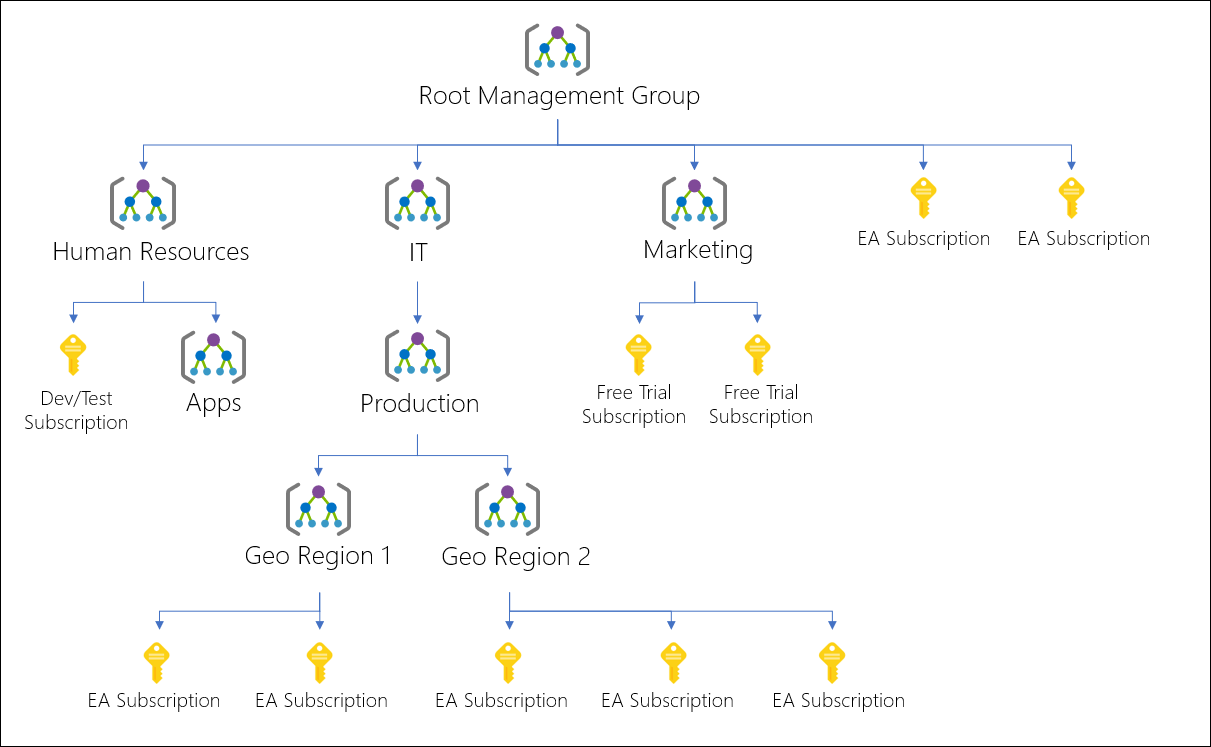
Relationship between the billing and management hierarchies
As outlined above, there is no relationship between the billing hierarchy, created in the EA portal, and management group hierarchy, which is created in either the Azure portal or by using PowerShell, CLI or REST API directly. As I mentioned previously, before management groups were available, customers tended to use the EA billing hierarchy to provide the required isolation between departements, business units, etc. But with the new concept of management groups, this gets a lot easier.
With regards to the relationship and dependencies between the two concepts, the following is important to know:
- An account owner (of a subscription) is always configured as owner of the subscription (is a member of the RBAC role owner, assigned on the subscription level).
- Transfering the (subscription) ownership within the same Azure AD tenant does not change the management group assignment; thus the same policies, definitions, etc. are still applied. Furthermore, the new account owner will be added as owner (subscription level).
- Transfering the (subscription) ownership across two Azure AD tenants does change the management group assignment.
- Members of the Azure AD Global Administrator role can elevate themselves to access all management groups and consequently all subscriptions. Therefore, it is highly recommended to monitor this group and membership, and use controls such as Azure AD Privileged Identity Management.
A summary or the differences in a nutshell
Finally, a short summary:
- The EA billing hierarchy is used for to manage invoices and payments methods, and track costs for Azure services (Azure Cost Management adds additional features).
- The management group hierarchy is used to structure the Azure environment, provides isolation between business units and teams, allows to apply secure guard rails and enables the large (cloud) scale management.
Azure Governance #0.1: How to empower DevOps
In my first blog about governance and the empowerment of DevOps (Dev/Ops teams), I wrote a brief introduction. I mentioned that governance is an important building block, but, there is more to consider. The picture below shows additional building blocks, and it represents my own view based on all my customer engagement. It does partially also represent Microsoft’s recommendations, but there is no official documentation:

From my perspective, the following building blocks are important in order to build the secure guard rails required to empower DevOps:
- Governance: Azure Management Groups, Azure subscriptions, Azure Blueprints and Azure Policy
- Enterprise hierachy
- Programatically create Azure subscriptions
- Assign security policies to Azure subscriptions
- Identity and access management: Azure Active Directory, Azure Role Based Access Control, Azure Multi Factor Authentication
- Conditional access to secure Azure Resource Manager access (portal, CLI, PowerShell, etc.)
- Role assignments automatically applied to Azure subscriptions
- Cost Management: Azure Cost Management
- Control cloud spend (budgeting, forecasting, etc.)
- Networking: Azure Virtual Networks (VNet in short), Azure ExpressRoute, Azure Application Gateway, etc.
- Hube and spoke model; hub VNet with centrally managed services required for hybrid networking, e.g. Azure ExpressRoute and Azure Firewall
- Automatically create spoke VNet for applications, including the needed peering with the hub VNet
- Security and compliance: Azure Security Center, Azure Policy, Azure Key Vault, etc.
- Enterprise-wide visibility into security and compliance (audit)
- Regulatory compliance
- Automatically create Key Vault for secrets and keys
In this blog series, I will address most of those building blocks listed below. However, the main focus will be the Governance building block. And by the way, once you have the guard rails defined and implemented, it does not matter if an application uses IaaS services, PaaS services or a mix of both.
Azure Governance #0: An introduction
Why governance?
Governance is a really important part of a cloud journey, for global enterprise accounts but also smaller customers. Governance defines the foundation for cloud, including how to manage cloud resources and services, ensure those resources are secured as required, defines who can access to the cloud, to resources and services, etc. Or in other words, governance is required to enable public clouds by defining secure guard rails!
Therefore, I would like to write this series for Azure Governance related blogs, outlining the most important information to ensure a (hopefully) successful journey.
Secure guard rails to empower DevOps
Traditional cloud custodian vs DevOps empowered
Governance for public cloud on an old approach means that customers have a central IT team responsible for cloud environments, called cloud custodians. All developers and operators do not have direct access to the cloud, exposed APIs, portals, etc., but instead have to work with this central team. The cloud custodian team either performs the tasks requested by the Dev/Ops team or grants the team members the required but still limited access to the cloud environment. Consequently, this central team attains control and is the king of all keys. And without surprise, all advantages of public cloud disappear.

However, in order to fully benefit from a public cloud (whether Azure, AWS or Google Cloud) and therefore from agility, faster time to market, etc. (all benefits of public cloud), you have to empower application teams and therefore empower DevOps. Empower means you grant the application (Dev/Ops) team full control to the environment (owner role on an Azure subscription level), so they can deploy and manage all resources and services required for their specific application. But of course, customers want to do this in a compliant approach; this is the concept of secure guard rails.
But why to empower DevOps and not build an IT service catalog and vending machine?
Infrastructure as Code (IaC) as an important building block for automation, and recommended to be used with any Continuous Integration and Continuous Deployment (CI/CD) pipeline (e.g. deploy the Azure App Service instance for your new web app and API app). Thus, many central IT teams (cloud custodians) believe in the power of a service catalog or vending machine for applications (a similar concept in the past called cloud brokers). And therefore, they want to create application deployment templates (Azure Resource Manager templates) and reusable patterns. In most scenarios, the goal of such a central IT team is to provide a catalog of various application and service templates, and the advantage that any application team just selects the template(s) needed for their new application. However, this approach has a few limitations, especially with cloud-native applications not only using virtual machines and storage:
- Lack of innovation: by limiting the application teams to use the full power of cloud (only a subset of services is available in the catalog or vending machine), any innovation is nipped in the bud (e.g. serverless containers vs a full Kubernetes cluster). Usually application teams (developers) know best what is required, want to use the latest technology in order to develop a new or modernize an existing application, etc.
- No-reusability: there is a risk that a template gets created for a one-time deployment; either a next version of a similar application uses other services (e.g. a team ‘A’ wants to use SQL Database single database and team ‘B’ Azure Cosmos DB), or the template does not provide the latest features recently announced (the template uses an old API version that does not expose the latest features).
- Missed time-to-market: working with a central IT team, which performs tasks on behalf of the application team, slows down the entire process.
Of course, this list is not exhaustive and there are other reasons why a service catalog or vending machine for all sort of applications has limitations. But, I do not want to say those concepts are useless or not important, but…
- A central IT team (cloud custodian) should create reusable templates (within a service catalog or vending machine) for centrally managed and shared services, such as the central virtual network, common Azure policy objects, Blueprint definitions, etc.; everything that is related to the guard rails.
- Application teams should create application-specific templates, which they can manage on their own pace.
In summary, a central IT team (cloud custodian) should invest their time and resources in building secure guard rails, rather than a service catalog or vending machines for specific applications (again, the application team will know best what is needed, works best for the given use dcase, helps to achieve business requirements and objectives, etc.).
How to define guard rails?
To build the required secure guard rails, cloud native capabilities and features have to be used. In Azure, this means Azure Management Groups, Azure Policy, and Azure Blueprints. By using those platform capabilities, one can allow Dev/Ops teams direct access to Azure (Azure portal, PowerShell, CLI, Visual Studio or REST APIs, etc.), in the compliant way a mature security and compliance organization requires (security requirements such as encryption enabled, allowed resources, default role assignments to ensure security visibility, etc.).

Let me give you an example. With Blueprints and Policy, a security engineer can apply a security policy that requires that all Azure SQL Database instances must be encrypted (SQL Transparent Data Encryption, TDE in short). This ensures that not even a subscription owner can create a SQL Database without TDE enabled. If a developer tries do deploy an unencrypted database, the request will be rejected and an audit event logged (and by using Azure Alerts, you can respond to audit events, for example create a service ticket in ServiceNow).
What is Azure Governance?
In Azure, the following services are covered as part of the Azure Governance documentation (please see https://docs.microsoft.com/en-us/azure/governance/ for the official documentation):
- Azure Management Groups
- Azure Policy
- Azure Blueprints
- Azure Resource Group
Not covered in the Governance documentation is Azure Monitor. However, from my perspective is also an important part of Governance, especially due to security monitoring and therefore Azure Security Center (a fundamental part of the guard rails concept). Consequently, I will also talk about Monitor and Security Center in a later blog.
What’s about the Enterprise Agreement portal and hierarchy created?
Another important topic that I have seen is the dependency on the billing hierarchy, which enterprise customers (or all customers and partners with an Enterprise Agreement) have to configure in the EA portal. Or in other words, what are the dependencies between this EA portal hierarchy and management groups hierarchy in the Azure portal. This will also be the first blog in this series…
Automate Role Assignment with Azure Container Registry
By using Managed Identities with Azure Container Instance (https://docs.microsoft.com/en-us/azure/container-instances/container-instances-managed-identity) and Azure Container Registry (https://docs.microsoft.com/en-us/azure/container-registry/container-registry-authentication-managed-identity), you can easily simplify the authentication process and experience; especially by using user-assigned identities.
Therefore and in case of Infrastructure as Code, it would also be handy if you could automate the role assignment as well, so that the user-assigned identity (used with your ACI or other Azure service) can easily authenticate against the Container Registry and for example is allowed to do a Pull.
Having said that, as follows the ARM template needed for this automation:
{
    "$schema": "https://schema.management.azure.com/schemas/2015-01-01/deploymentTemplate.json#",
    "contentVersion": "1.0.0.0",
    "parameters": {
        "acrName": {
            "minLength": 5,
            "maxLength": 50,
            "type": "String",
            "metadata": {
                "description": "Name of your Azure Container Registry."
            }
        },
        "acrAdminUserEnabled": {
            "defaultValue": false,
            "type": "Bool",
            "metadata": {
                "description": "Enable admin user that have push / pull permission to the registry. Can only be set to false."
            }
        },
        "acrSku": {
            "defaultValue": "Basic",
            "allowedValues": [
                "Basic",
                "Standard",
                "Premium"
            ],
            "type": "String",
            "metadata": {
                "description": "Tier of your Azure Container Registry."
            }
        },
        "spIdentity": {
            "defaultValue": "162c0baa-1521-4b20-8377-5ed370e4556b",
            "type": "String",
            "metadata": {
                "description": "The service principal ID of the used managed identity."
            }
        }
    },
    "variables": {
        "arcPullRole": "[concat('/subscriptions/',subscription().subscriptionId, '/providers/Microsoft.Authorization/roleDefinitions/', '7f951dda-4ed3-4680-a7ca-43fe172d538d')]",
        "roleAssignmentName": "[concat(parameters('acrName'), '/Microsoft.Authorization/', guid(concat(resourceGroup().id), variables('arcPullRole')))]"
    },
    "resources": [
        {
            "type": "Microsoft.ContainerRegistry/registries",
            "sku": {
                "name": "[parameters('acrSku')]",
                "tier": "[parameters('acrSku')]"
            },
            "name": "[parameters('acrName')]",
            "apiVersion": "2017-10-01",
            "location": "[resourceGroup().location]",
            "tags": {
                "displayName": "Container Registry",
                "container.registry": "[parameters('acrName')]"
            },
            "properties": {
                "adminUserEnabled": "[parameters('acrAdminUserEnabled')]"
            }
        },
        {
            "type": "Microsoft.ContainerRegistry/registries/providers/roleAssignments",
            "name": "[variables('roleAssignmentName')]",
            "apiVersion": "2017-05-01",
            "dependsOn": [
                "[resourceId('Microsoft.ContainerRegistry/registries', parameters('acrName'))]"
            ],
            "properties": {
                "roleDefinitionId": "[variables('arcPullRole')]",
                "principalId": "[parameters('spIdentity')]"
            }
        }
    ],
    "outputs": {
        "acrLoginServer": {
            "type": "String",
            "value": "[reference(resourceId('Microsoft.ContainerRegistry/registries', parameters('acrName')),'2017-10-01').loginServer]"
        }
    }
}What is the use case of the Kubernetes service address range in Azure Kubernetes Service?
If you want to configure your Azure Kubernetes Service (AKS) cluster with the Advanced Networking method (per https://docs.microsoft.com/en-us/azure/aks/configure-advanced-networking), you have to enter different IP address ranges. One of the address range is called “Kubernetes service address range”. And based on the description, the address range is used for Kubernetes Services.
However, it is important to know that this address range is actually only used for the Service type ClusterIP, and not for the type LoadBalancer. The internal Azure Load Balancer, which will be configured when specifying the type LoadBalancer and in case of private IP connectivity, still gets an IP address assigned from the virtual network/subnet that you selected. Btw, another recommended practise is to connect the internal load balancer into a dedicated subnet (not the one that you use for the Nodes and Pods), as described here https://docs.microsoft.com/en-us/azure/aks/internal-lb#specify-a-different-subnet.
Therefore, a network architecture could look like as follows:

Update: below, you can find reference to more detailed guides.
Best practices for Management Groups and Blueprints
This is somehow the 2nd part of my first blog available here https://dzemp.wordpress.com/2019/01/18/best-practices-for-azure-subscription-management/.
As you probably know, at Ignite 2018 Microsoft released a new way of modeling your Enterprise hierarchy: Azure Management Groups.
Since then, I was involved in discussions about the best practice to use Management Groups, to model the hierarchy. And with this very first blog, I would like to share my view:
First of all, I pretty much agree with the statement here https://docs.microsoft.com/en-us/azure/architecture/cloud-adoption/appendix/azure-scaffold?toc=/azure/governance/toc.json#define-your-hierarchy:
Create different Management Groups for Production and Non-Production enivornments
Why? It is much easier to manage roles (Azure RBAC) and also to assign Azure Blueprints. For example, you can use and assign a Blueprint definition including role assignments for your developers and corresponding dev and test security policies to a non-production Management Groups. All devtest Azure subscriptions linked to this Management Group then automatically inherit the Blueprint definition. Therefore, it is also important to consider best practices for Azure subscription management, where I also recommend to create subscription for Production and Non-Production environments (in addition to application or workload-specific subscriptions).
With regards to Blueprints, and the question about how many Blueprints should be created and then assigned to Management Groups, there are a few questions you should ask yourself:
- What are the foundational resources that are required for each environment?
- How many different types of environment exist (e.g. a Blueprint for Infrastructure as a Service or Platform as a Service-based, etc.)
- How many teams are responsible for environment set up?
There are often dedicated networking teams, security teams, etc. They may choose to collaborate on a “unified” Blueprint definition or choose to break them down into multiple Blueprints that each team manages. In this case, multiple Blueprints can be assigned, so each Blueprint can represent a “component” in an environment.
Based on the information and recommendations above, a possible hierarchy using Management Groups and Blueprints looks like this:


